|
|

黄金糕 最新 支持1420版本,可开单。
EA has high-performance live track records of different set files:XAU Risky Vol
XAU Balanced Vol
XAU Balanced
MT4 version can be found hereGolden Pickaxe is a mean-reversion grid trading system that uses machine learning technology to place high-profit potential trades on the Gold market. It uses real market inefficiencies to its advantage to have an edge over the market. The EA has 5 predefined set files, which are essentially 5 different trading systems on gold. You may choose the default option (XAU Risky) or have your own preferenceSupported currency pairs: XAUUSD (aka GOLD)
Timeframe: M1Features:Allows you to retrain Neural Network on your broker's dataAdvanced News and Stock Market Crash FilterFlexible customization with a lot of filters and optionsSolid backtest and live performance
Statistic Panel with Self Diagnostic System and Neural Network Forecast indicatorMuch cheaper than available high-quality alternativesVery easy to use: just read 2 lines of instructions below
Backtests should be done with Tick Data Suite GMT+2 with US DST. This GMT offset is used by most brokers
How to installThe EA must be attached to ONLY one XAUUSD M1 chartYou need to give the EA access to the news list website and time server for news filter and time detection functionality to work correctly. Here is the link for the guide on how to do that (from 1:00 to 2:05)Video on the EA installationArchive with set files and the guide
Requirements
Hedging account!The EA is NOT sensitive to spread and slippage. But I advise using a good ECN brokerThe EA should run on a VPS continuouslyWith only 1:30 leverage I advise not to use higher than low risk settings on a less than $6000 account, otherwise you might have problems with free margin. With 1:100 leverage it should be fine with up to significant risk setting on a $1000 account
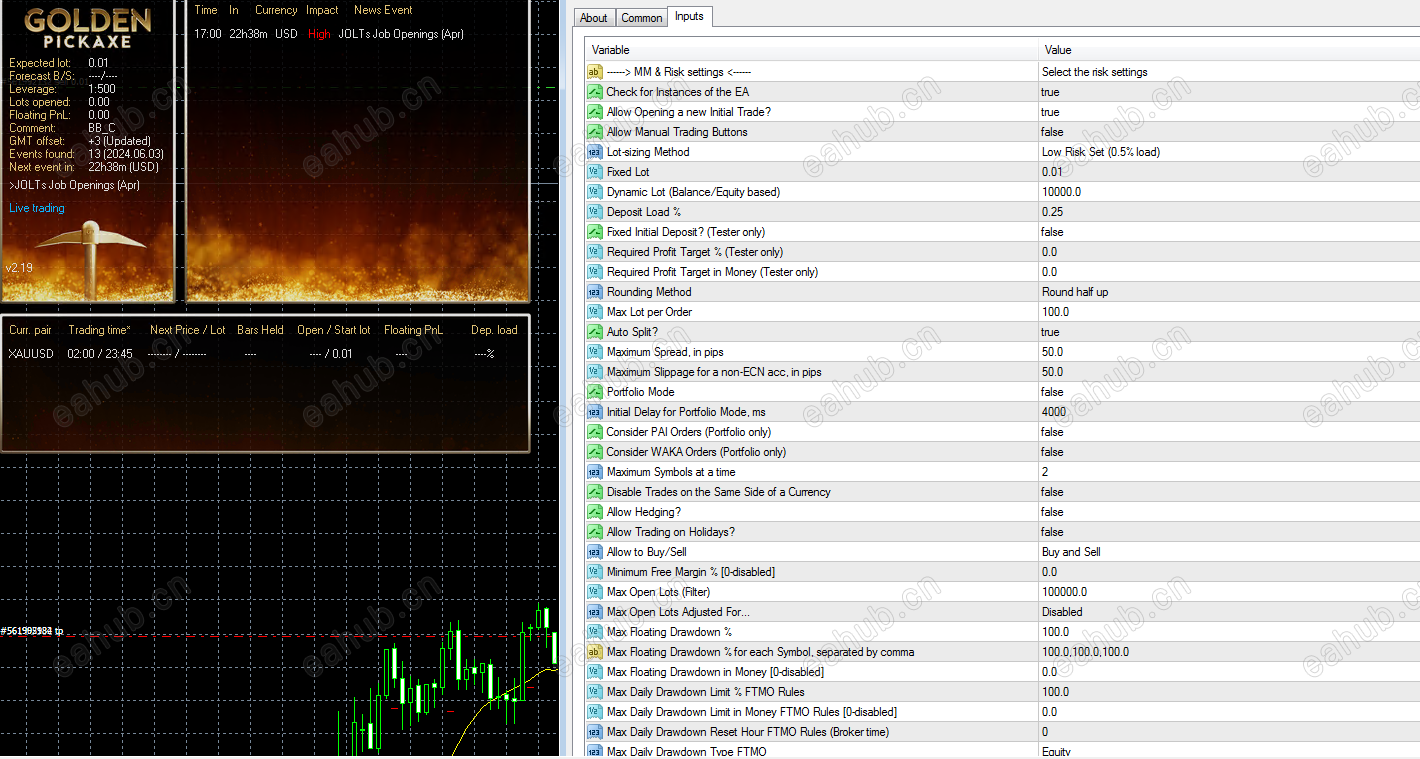
MM & Risk settings
Allow Opening a new Grid - on/off opening of new grids. It does not affect the already open gridsLot-sizing Method- select the lot sizing method according to the risk you want to take: Fixed Lots will use fixed lot size from the "Fixed lot" parameter, Dynamic Lots will use 'Dynamic Lot' parameter, Deposit load will calculate lots based on deposit load%, and 4 predefined presets will calculate risk automatically for youFixed Lot- fixed trading lot for the initial trade.Dynamic Lot (Balance/Equity based)- balance/equity to be used per 0.01 lotDeposit Load % - % of the deposit that will be totally used to open the initial trade
StrategyPercentage Pips Mode - on/off percentage pips mode. 1 per. pip = 0.0001 * Curr. PricePrice Channel Period - period of Donchian channels used to calculate the upper/lower levelsPrice Channel Time Frame - working TF for the Donchian channelsDaily EMA Period - period of the daily EMA for calculating the medium-term trendVolatility Filter - allows you to avoid risky trades during periods of high volatility
Machine LearningEnable Neural Network Filter – on/off filtering of trades using ML technologyUse Built-in Perceptron Configuration – if true, the EA will use built-in Perceptron config. If false, the EA will load the custom config file Perceptron_Config.txt located in the common directory for all MT4/5 terminalsMin Probability of Profit % - min. predicted probability that a trade will result in profit
Perceptron TrainingPerceptron Training Mode – if true, the EA will try to train Perceptron and save results in the external config file Perceptron_Config.txtDataset Max Size - maximum dataset size for raw dataNeuron in Hidden Layer - number of neurons in the hidden layer. If zero, then no hidden layer will be usedTraining Algo - training algorithm: Levenberg–Marquardt or L-BFGSNumber of Restarts – max. number of restarts to find global optimum
Grid settings
Trade Distance - min. step in pips between grid trades2nd Trade Multiplier- multiplier for the 2nd trade3rd-5th Trade Multiplier- multiplier for the 3rd-5th trades6th- Trade Multiplier- multiplier for the 6th-.... tradesMaximum Trades- max number of grid trades
Others
Trade Comment- comment for ordersUID (0...9)- unique EA instance number. Usually no need to change it
 |
|



 发表于 2026-8-12 11:20:59
