|
|
摘自官网使用变量现在我们来看看在声明这些变量后该对它们做什么。来一个简单的例子:double a = 50.0;// declare a value with a floating point and
// assign the value 50 to itdouble b = 2.0;
double c;
c = a + b; // assign to the variable c sum of variables
// a and b. Now the value is equal to 52. Like after
// any other instruction put a semicolon (“;”)
c = a - b; // diminution, c = 48
c = a*b; // multiplication, c = 100
c = a / b; // division, c = 25
c = (a + b)*a; // place the operations that should be performed
// first inside the brackets. In our case
// first we get the sum of a and b
// after that this sum will be multiplied by a and assigned to c
c = (a + b) / (a - b); // if there are several operations in brackets,
// they will be performed
c = a + b*3.0; // according to mathematic rules first you will get
// multiplication b and 3, and then the sum
如果需要用某个变量执行一项运算,并分配一个结果给它,例如加 5,可以采用以下方式之一:int a = 5;
a = a + 5; // add 5
a += 5; // analogous
a = a*5;a *= 5; // multiply a by 5 and assign to it
a /= 5; // divide and assign如要加 1 或减 1,用以下方法:int a = 5;
a++; // add1, it is called increment
а--; // subtract 1, it is decrement这都可以,但用这种脚本的话,您无法确定这一切是否能正常运行,因为屏幕上没有任何反应。
这就是显示结果会很方便的原因。为此,我们需要使用一个集成函数 MessageBox()。
MessageBox()一个函数就是一套指令,它接受参数,并根据参数显示结果。在我们的示例中,MessageBox() 函数接受两个参数:第一个是消息文本,第二个是标题文本。示例如下:
MessageBox("Hello, World! There is some text.","caption");复制代码要执行一个函数,首先写入其名称。别忘了区分大小写!然后在括号中写入参数,用逗号隔开。我们示例中的参数是字符串类型的参数。正如我们记得的那样,所有行都用引号(“”)括起来的。在任何指令的末尾加一个分号。为了正确理解,我们来看图。它显示了代码和结果之间的关联。
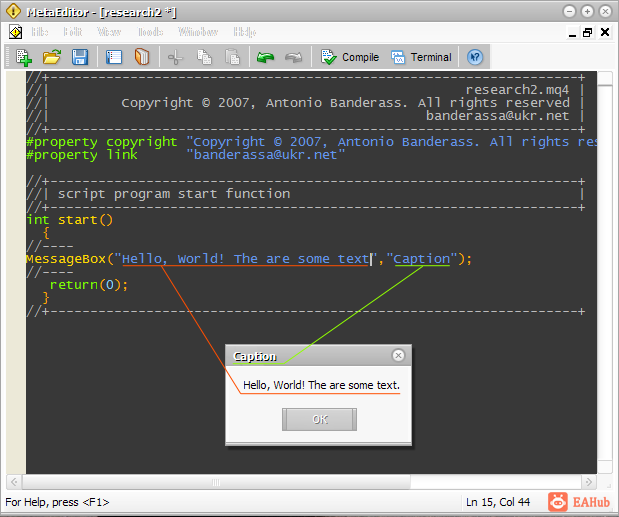
当然,一切正常。但我们如何展示其他类型的变量呢?很简单 - 牢记在心里:int a = 50;
int b = 100;
MessageBox("It is very simple. a+b=" + (a + b), "a+b=?") 得到的结果是:
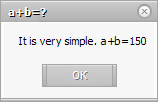
如您所料,MQL4 就是这么设计的,当我们尝试向某行中添加其他数字类型时,它会自动将数字传递到行中并合并它们。这真是一个美妙的特性!您也可以对字符串变量进行这种运算:int a = 50;
int b = 100;
string str1 = "a + b =";
str1 += a + b; // now str1 = "a + b = 150" // now use the variable str1 as // a first parameterMessageBox(str1, "a + b = ?");现在您知道如何使用 MessageBox() 函数提取不同的数据了。但是,能够显示简单的数学运算结果又算什么?我们对 MQL4 的要求可不仅仅是算个加法和乘法,不是吗? |
|



 发表于 2026-8-27 22:42:00
