|
|
Lion Trader Pro
Description
Lion Trader Pro is a trading robot for the trading on forex. This is a Trend Following system that trades mainly during Asian and NY sessions.
The EA has been subjected to stress tests for a period of 17 years and passes every year with a very advantageous profit/drawdown ratio.
Lion Trader Pro Work in GBPUSD M1
This Ea is Fifo Compliance
It analyzes the market without using obsolete indicators and pattern, looking for the main trend, entering the market based on volatility and an
artificial intelligence algorithm to predict the likely future trend.
The maximum accuracy backtests allowed show a high payout rate and good resistance to unexpected market events.
Recommended Test Period 2003 to Today. GBPUSD it is not recommended for use on other pairs, without being aware of the increased risks.
Recommendations
Symbol GBPUSD
Timeframe M1
Test from 2003
Settings Default or set files
Brokers Broker with low spread and commission, ecn, stp or ndd
Minimum Deposit 2000 usd
Market Entry method Market Order
Tester Method tick by tick
Fifo Compliance Yes
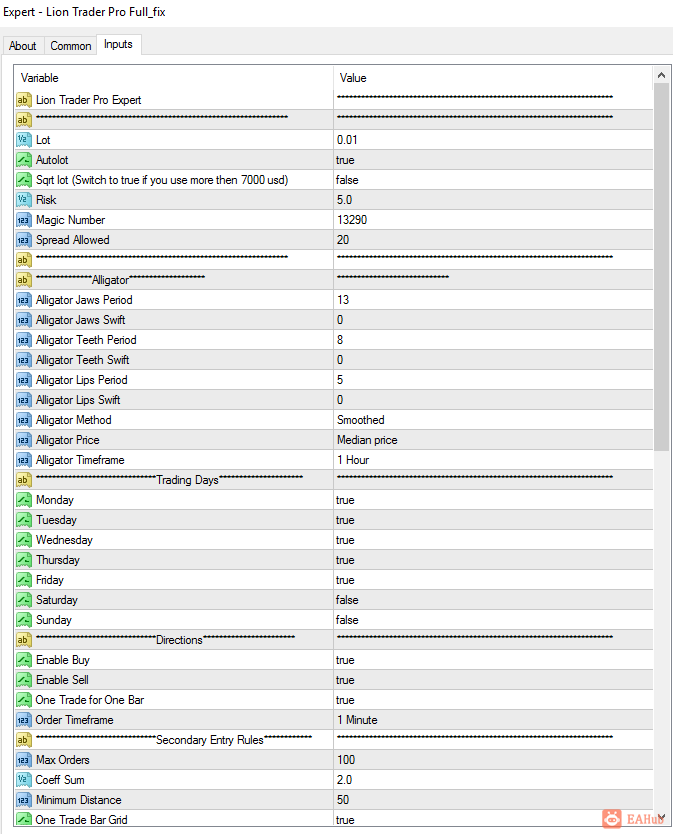
Settings
Lot: lot amount with autolot disabled
Autolot: Enable autolot or disable it
Risk: risk for autolot calculation
Magic Number: id for identify Ea orders
Spread Allowed: spread limit, over no trade will be open
Alligator Jaws Period: Alligator Jaws Line Period
Alligator Jaws Swift; Alligator Jaws Line Swift
Alligator Teeth Period: Alligator Teeth Line Period
…
Alligator Method: Alligator Ma Method
Alligator Price: Alligator Applied Price
Alligator Timeframe: Alligator Applied Timeframe
Monday: Enable trading on this Day
Tuesday: Enable trading on this Day
Wednesday: Enable trading on this Day
Thursday: Enable trading on this Day
Friday: Enable trading on this Day
Saturday: Enable trading on this Day
Sunday: Enable trading on this Day
Enable Buy: Enable Buy Trade
Enable Sell: Enable Sell Trade
One trade for one bar: only one trade for each bar
Order Timeframe: Timeframe for Ea First order
Max Orders: Maximum number of orders
Coeff Sum: Position increase coeff
Minimum Distance: Minimum Distance For secondary Positions
One Trade Bar Grid: if true, robot can open only one trade for bar for grid orders.
Timeframe Secondary Order: Timeframe for secondary Trades.
Take Profit: take profit for orders
Modify Take Profit for First Order: Use a different take profit for the first order
Take Profit for first order: take profit for first order
Close only end of bar: close trades only at the end of M1 bar
Enable Money Max Loss: Enable Loss Limit in money
Every Microlot: Moltiply the amount of “money max loss” x 100 x lot
Stop Trading When Hit: Stop Trading when you hit max loss
Maximum Monetary loss: Maximum Monetary Loss amount
Close Friday: Close all trades on Friday, only if they are in profit, and do not open any others.
Close Friday Hour: closing time on Friday
Trade Comment: trades comments
Broker Utc: Broker utc time (usually 2)
Enable News Filter: Switch to false for disable news filter or to true for enable it.
News Filter Link:
http://ec.forexprostools.com/?columns=exc_currency,exc_importance&importance=1,2,3&calType=week&timeZone=15&lang=1
Pause After News in minuts: Trading pause after news in minuts
Pause Before News in minuts: Trading pause before news in minuts
Enable High Impact News: Switch to true for stop trading in high impact news
Enable Medium Impact News: Switch to true for stop trading in medium impact news
Enable Low Impact News: Switch to true for stop trading in low impact news
Broker Gmt Offset: Broker current gmt.
Change Chart Color: Change Chart Color in Trader Pro Colors
Show Panel: Show panel
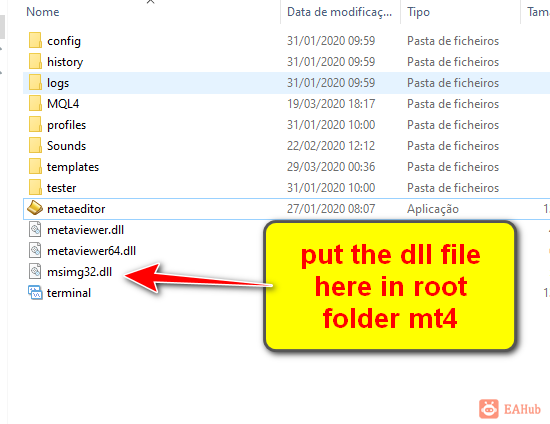
注意(重要):里面的“ MSIMG32.DLL”是用来模拟环境的,某些抗毒软件可能会报毒。您需要使您的抗毒软件“允许”。
msimg32.dll必须放置在终端根文件夹中,靠近terminal.exe文件如图
 |
|



 发表于 2026-8-6 07:58:59
