|
|
TopMaster EA TopMaster EA is a fully automated trading system on the most popular major currency pairs. The EA is catching volatility breakouts using market momentum to its advantage. It uses pure Price Action data, not relying on lagging technical indicators. It is designed to thrive during most challenging market conditions associated with high levels of uncertainty. It's more relevant now than ever, with important recent changes on the global markets.
MT5 version: https://www.mql5.com/en/market/product/48010
Every trade is protected by SLThe EA can work in 3 modes:Strategy A (Recovery) - recovers faster during drawdowns by increasing position sizes after a closed loss. It gives more comfortable growth curveStrategy B (Classic) - relatively rare trading, but quality of the average trade is at it's maximum. No martingale, grid or hedging is usedStrategy C (Reversal) - aims to profit from the reversal of trends in markets, as most popular major pairs seem to be in the mean-reverse state right now. It gets in with a market order in the direction opposite to relatively strong fake price movement. It utilises powerful deep learning techniques to filter out market noise to leave only the most effective entries.
All modes are FIFO compliant
Features
Stable growth curve as a result of a high % of winning tradesStress-tested on all available historyAutomatic GMT adjustmentMinimum depositis $50
Easy setup and use
Timeframe: M15
Currency pairs: EURUSD, GBPUSD
Strategy A requires you to open Account history!
To view MT4 trade history, log in to MT4 and go to Terminal window where you would normally see your account balance. Choose Account history tab at the bottom. Right click within to choose All History or Last 3 Months
Live signals
Strategy A (Recovery) EURUSD: https://www.mql5.com/ru/signals/565703
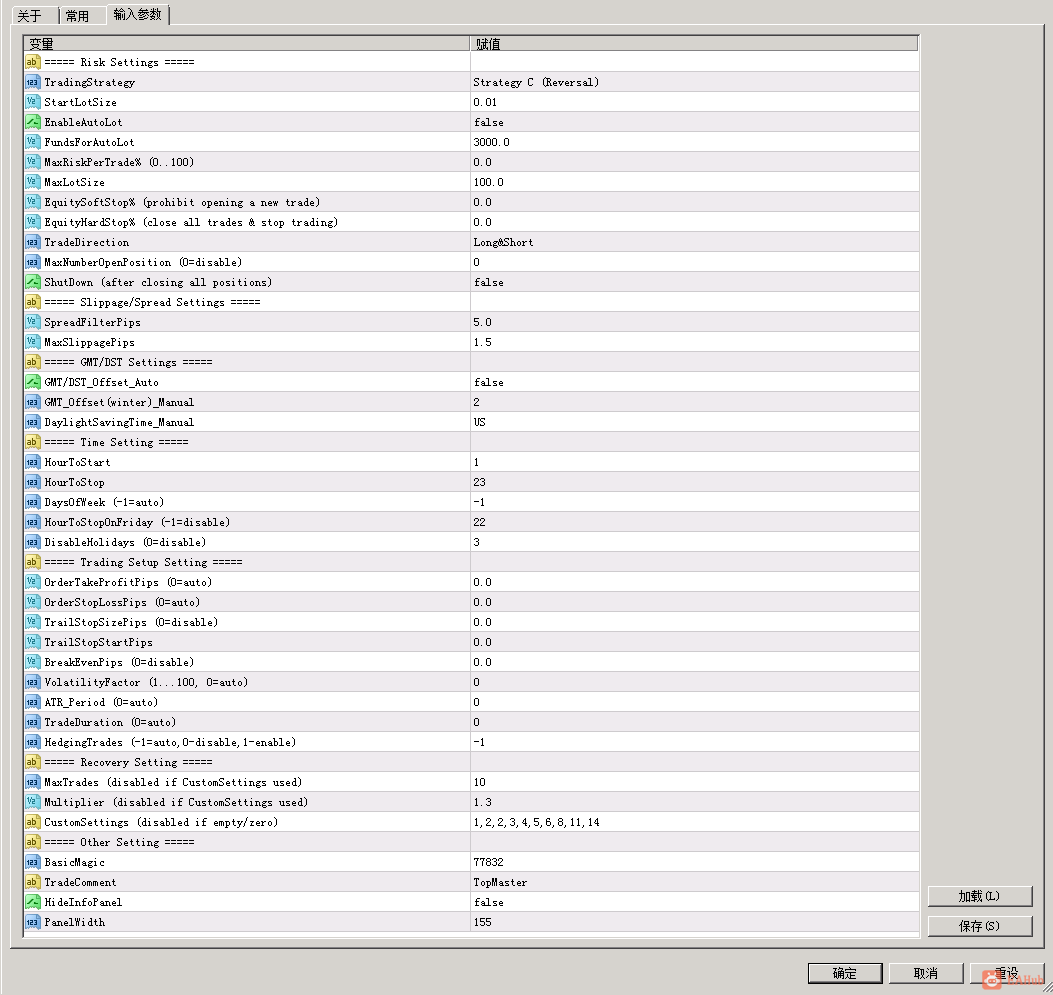
Inputs
TradingStrategy - select the strategy you want to useStartLotSize - proportional lot size if EnableAutoLot=true and fixed lot size in case EnableAutoLot=falseEnableAutoLot - trading lot will increase with an increase in your account's balanceFundsForAutoLot - amount of balance to be used for every StartLotSize if EnableAutoLot=true. E.g. FundsForAutoLot=1000 andStartLotSize=0.05 means that for every $1000 there will be 0.05 lots openedMaxLotSize - max allowed lot sizeEquitySoftStop% - the EA will not open initial order if equity falls below the specified % of the balanceEquityHardStop% - the EA will not open any new order and will close all open positions if equity falls below the specified % of the balanceTradeDirection - parameter to limit direction, long/shortMaxNumberOpenPosition - if the max number of open positions exceeds this value, the EA will not open a new tradeDisableHolidays - not to trade during NY holidaysShutDown - set it to true if you don't want to trade after the current position is closedSpreadFilterPips - if spread is higher than this value, the trade won't be openedMaxSlippagePips - max slippage for Instant account (not ECN)GMT/DST_Offset_Auto - if true, the EA will find the GMT offset automatically. Allow requests to https://www.worldtimeserver.comGMT_Offset(winter)_Manual - set your broker's time zone (in winter)DaylightSavingTime_Manual - if your broker uses daylight saving time, set this to Europe or USOrderTakeProfitPips - the size of TP in pips (1 pip = 10 points)OrderStopLossPips - the size of SL in pipsTrailStopSizePips - trailing stop when a position is in profit. The trailing stop level will follow position if it becomes increasingly profitableTrailStopStartPips - number of pips to activate trailing SLBreakEvenPips - profit in pips at which the EA automatically moves SL to break evenTradeDuration - set the max position holding time, in barsHourToStopOnFriday - specify an hour to stop trading and close all open positions on Friday eveningMaxTrades - max number of recovery tradesMultiplier - recovery coeff.CustomSettings - custom coefficients separated by commasBasicMagicNumber - unique number to track open trades. It must be less than 99999TradeComment - comment to your trades
Recommendations
Test any changes thoroughly before running EA on a live account
Try the demo now!
 |
|



 发表于 2026-8-6 14:53:59
