Infinite Storm EA Infinite Storm EA is a safe and fully automated expert advisor that analyzes market trend and price movements and thanks to that is able achieve high rate of winning trades.Every order has StopLoss (either real or virtual) and EA has implemented advanced filtering functions together with spread and slippage protections.
This EA does NOT use any of the dangerous strategies like Martingale, Grid or Arbitrage. This EA is fully customizable by user.This EA is not limited by trading pair or time-frame (recommended to use on EURUSD H1 time-frame. Infinite Storm EA default settings is optimized for EURUSD H1.
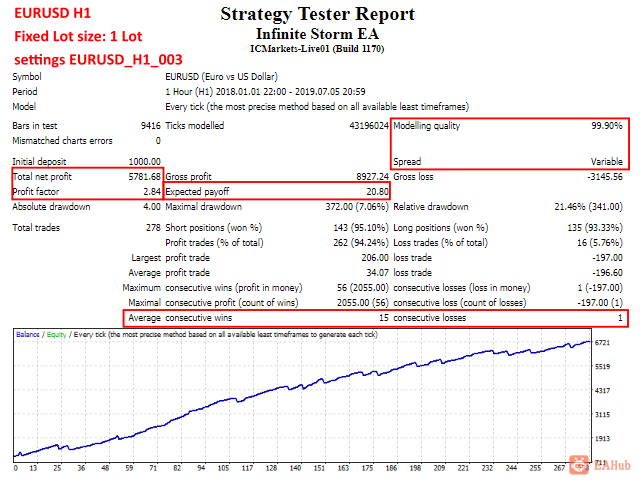
Infinite Storm EA is verified on both platforms (MT4 and MT5) and successfully passed tests and simulations with 100 % real ticks in MT5 with variable spread and simulated execution delays as well as with 99.90 % real ticks in MT4 with variable spread.
Link to the MT5 veresion: https://www.mql5.com/en/market/product/40251Click >> HERE << to visit the website with set files examples, additional information, optimization recommendations, FAQ, etc.
Recommendations
Adapt your own risk settings according to the account equity and always verify with back-testTrue ECN broker with low spread and VPS server with small delays is recommended for any type of automated tradingUse minimal deposit of 100 USDUse EURUSD H1 timeframePlease avoid high volatile pairs with insufficient market liquidity like Gold (XAUUSD), Bitcoin (BTCUSD) etc.
Watch my other products: https://www.mql5.com/en/users/sevenfourseven/seller
Trading Instructions
Move EA to the chart (simply drag and drop)When pop up window appears select desired settings (for EURUSD H1 you can use default settings)If using more trading pairs and more charts, make sure that each chart has unique Magic number !!!In settings window always adjust FixedLotSize (or RiskInPercentOfBalance when UseAutolot is enabled) base don you account equity and your own trading riskMake sure you sufficient margin to open new positions, especially if using low leverage accountsConfirm settings and let the EA trade
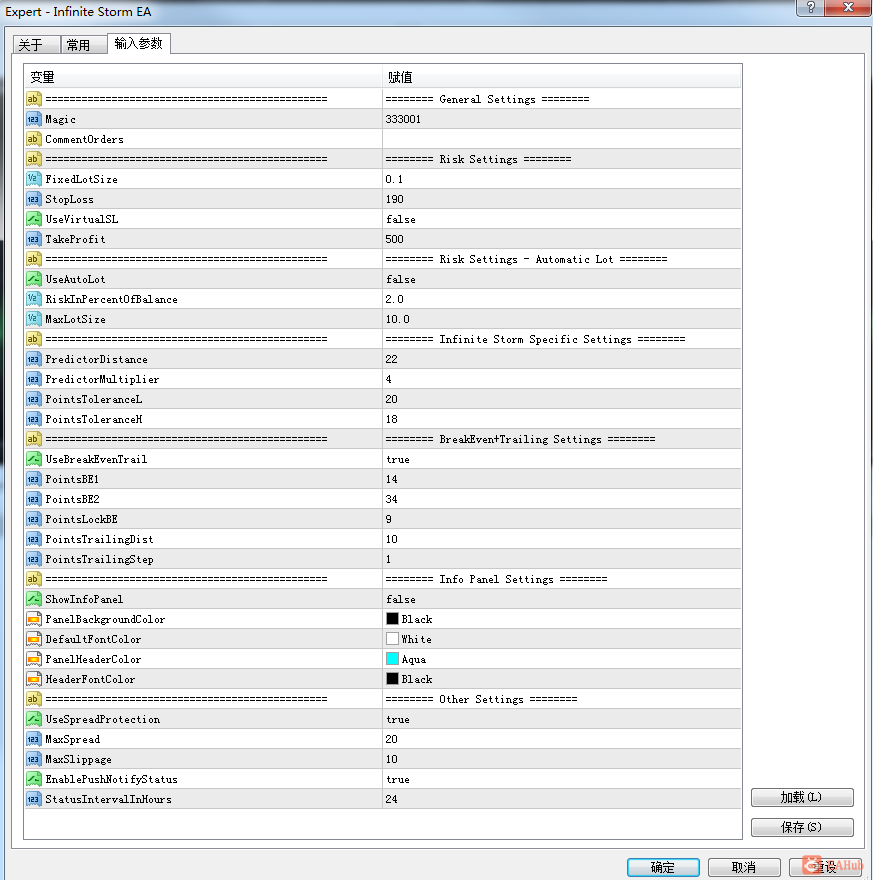
ParametersGeneral SettingsMagic - Magic number - MUST be unique for each chartCommentOrders - Optional - Custom comment for orders
Risk Settings
FixedLotSize - Fixed size of the Lot to trade (UseAutoLot has to be disabled)StopLoss - Stop loss in pointsUseVirtualSL - Enable/Disable Virtual stop loss (recommended is disable - "false")TakeProfit - Take profit in points
Risk Settings - Automatic Lot
UseAutoLot - Enable/disable automatic lot size calculation base don account balance and StopLossRiskInPercentOfBalance - Risk in percent of account balanceMaxLotSize - Maximum size of the lot
Infinite Storm Specific Settings
PredictorDistance - Main parameter to determine the trend and price movementsPredictorMultiplier - Determines the number of cycles to analyse trend and price movementsPointsToleranceL - Tolerance for trend and price movements (Low tolerance)PointsToleranceH - Tolerance for trend and price movements (High tolerance)
BreakEven + Trailing Settings
UseBreakEvenTrail - Enable/Disable Break Even + Trailing StopPointsBE1 - Break Even 1st level in pointsPointsBE2 - Break Even 2nd level in pointsPointsLockBE - Points lock in profit after Break Even (but it is also combined with the 2nd level of Break Even)PointsTrailingDist - Trailing Distance in PointsPointsTrailingStep - Trailing Step in Points
Info Panel Settings
ShowInfoPanel - Show/Hide Info PanelPanelBackgroundColor - Info Panel background colorDefaultFontColor - Info Panel main font colorPanelHeaderColor - Info Panel Header background colorHeaderFontColor - Info Panel Header font color
Other Settings
UseSpreadProtection - Enable/Disable spread protectionMaxSpread - Max spread in points (Running mean spread)MaxSlippage - Max slippage for positions to openEnablePushNotifyStatus - Enable/disable sending EA status via Push notifications (interval of notification set by StatusIntervalInHours)StatusIntervalInHours - Interval in hours for EA status message (Printed to the Expert tab)



 发表于 2026-8-8 19:50:59