|
|
最后由 matricbolic 于 2021-8-15 11:39 编辑
The Forex robot works at certain time intervals at the beginning of the American session. The Expert Advisor opens pending orders every hour in both directions: Buy Limit and Sell Limit, at a distance of 10 points from the current price.The Forex robot works at certain time intervals at the beginning of the American session, when it is early morning or early lunchtime in Canada. During these intervals, the Forex trading robot opens every hour pending orders in both directions: Buy Limit and Sell Limit, at a distance of 10 points from the current price (for 4-digit quotes) or 100 points from the current price (for 5-digit quotes).
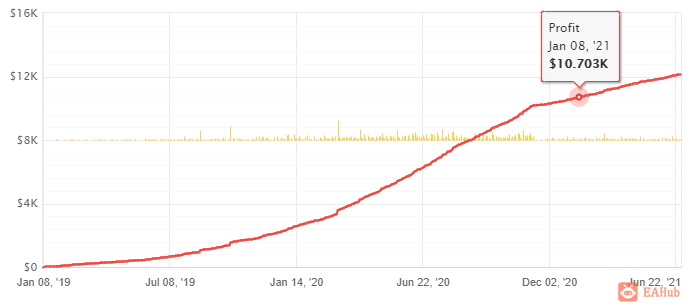
Recommendations
Work best on GBPCAD, EURCAD, USDCAD, or any other pairs where CAD is the second currency.Work best on H1 Timeframes
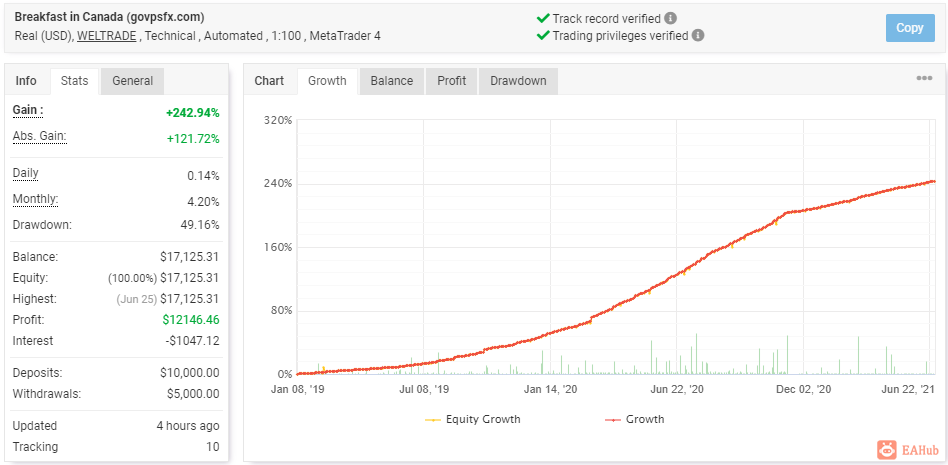
Real account -
https://www.myfxbook.com/members ... -govpsfxcom/2948642BASIC SETTINGS
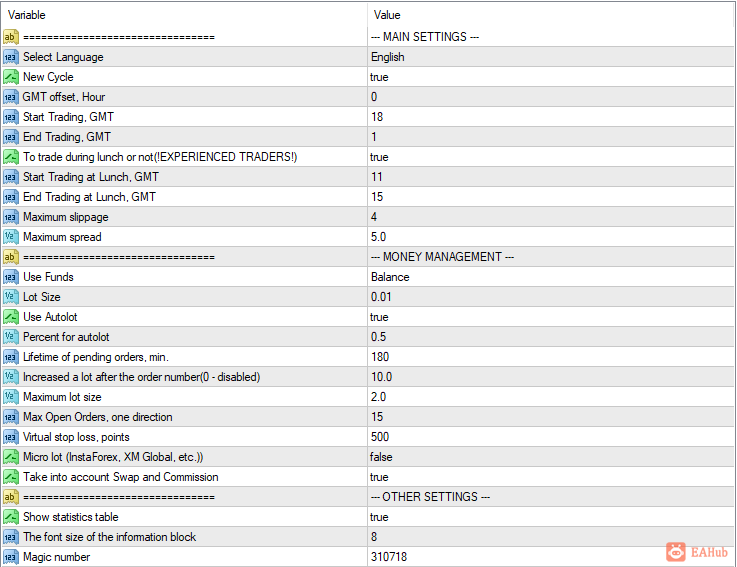
Time offset from GMT, hours – Your terminal time offset from GMT, indicated in hours.Trading start at GMT 18 – Trading start time in the American session, indicated in hours by GMT.End of trading according to GMT 1 – Time of the end of trading in the American session, indicated in hours according to GMT.Trade at lunch or not (FOR EXPERIENCED TRADERS) – Trade during lunch in Canada or not, TRUE – ALLOWED, FALSE – FORBIDDEN.Trading starts at lunchtime at GMT 11 – Trading starts at lunchtime, indicated in hours by GMT.End of trading at lunchtime at GMT 15 – End of trading at lunchtime, indicated in hours by GMT.Maximum slippage, points – The maximum allowable slippage for opening or closing orders, specified in points.Maximum spread – The maximum spread at which it is allowed to place pending orders. Fractional values are supported on 5-decimal places, on 4-decimal places it will be rounded if you set a fractional value.
MANI MANAGEMENTMeans used – What means to use for trading and for calculating the autolot. The default is Balance.Lot Size – Initial fixed lot size. For InstaForex or XM Global, multiply the value by 10.Use autolot – Whether to use autolot or not. TRUE – ALLOW, FALSE – DISABLE.% of funds for an autolot – The percentage of funds for calculating an autolot. For InstaForex or XM Global, multiply the value by 10.Lifetime of pending orders, min. – How long will it take to delete unworked pending orders. The time is indicated in minutes.Increased lot after order no. (0 – disabled) – After which order in the market to open orders of increased volume.Maximum Lot Size – The allowed maximum order volume.Virtual stop loss, points – The size of the virtual stop loss. Indicated in points.Micro lot (InstaForex, XM Global, etc.) – Enable or support micro lots, such as InstaForex or XM Global, etc. FALSE – DISABLE, TRUE – ENABLE.Consider swap and commissions – Whether or not swap and commissions are taken into account when calculating profit for closing positions. FALSE – DISABLE, TRUE – ENABLE.
INFORMATION BLOCK SETTINGSShow statistics table – Whether or not to show the statistics table on the balance, open positions and earnings on the chart. TRUE – ALLOW, FALSE – DISABLE.Information block font size – What font size to use for displaying the information block on the chart.Information block font size – What font size to use for displaying the information block on the chart.Magic number – Magic number to distinguish your orders from others. For orders in the Sell direction, the EA uses this number + 1.
 |
|



 发表于 2026-8-6 11:59:59
