|
|
Day Hunter Pro EA 拥有多年稳定交易和低回撤的实时记录,这表明其可靠性。它是一个复杂的剥头皮系统,利用先进的进入和退出算法以及智能过滤技术来识别市场平静时期最安全的进入点。该系统着眼于长期稳定增长,使其成为多年来开发并不断更新以纳入交易中最新创新的专业工具。与其他自称是交易“圣杯”的系统不同,Day Hunter Pro EA 采用严格的基于规则的交易方法,确保在实现回报最大化的同时控制风险。这意味着系统中不使用有风险的鞅或网格策略。Day Hunter Robot的特点多种货币对的一张图表设置使用 Day Hunter Pro EA,交易者可以通过单一图表设置轻松管理多个货币对。此功能简化了交易并节省了时间,使您可以专注于交易策略的其他方面。风险管理Day Hunter Pro EA 采用严格的风险管理协议,避免像鞅或网格系统这样的风险策略。相反,它使用挂单进行交易,并为每笔交易设置止损以保护您的资金。高级新闻过滤器EA 还拥有先进的新闻过滤器,可自动监控并避免在影响重大的新闻事件期间进行交易。这可确保 EA 在稳定的环境中运行,并将突然的市场波动影响您的交易的风险降至最低。自动 GMT 检测和自诊断系统为了简化操作,Day Hunter Pro EA 结合了自动 GMT 检测功能,自动将您的交易调整到您经纪商的时区。此外,自诊断系统会检测您的交易设置的任何潜在问题,并提醒您进行必要的调整。负交换滤波器Day Hunter Pro EA 中的负面隔夜利息过滤器功能有助于保护您的账户免受隔夜利息的负面影响。通过识别和避免掉期利率不利的交易,此过滤器可确保您的交易始终处于最佳条件。请先在模拟账户中测试至少一周。另外,请熟悉并了解此Day Hunter Pro 机器人的 工作原理,然后仅在真实帐户中使用它。
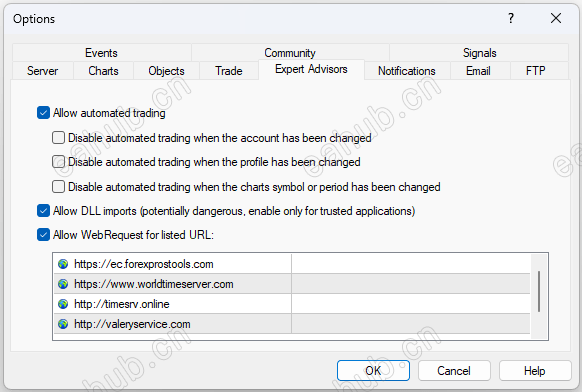
打开工具 –> 选项 –> 专家顾问。检查选项“允许列出的 URL 的 WebRequests ”添加以下内容:“ https://ec.forexprostools.com ”,“ https://www.worldtimeserver.com ”,“ https://www.investing.com ”, “ http://valeryservice.com ” 然后按“确定”。EA 从指定的网站获取新闻。
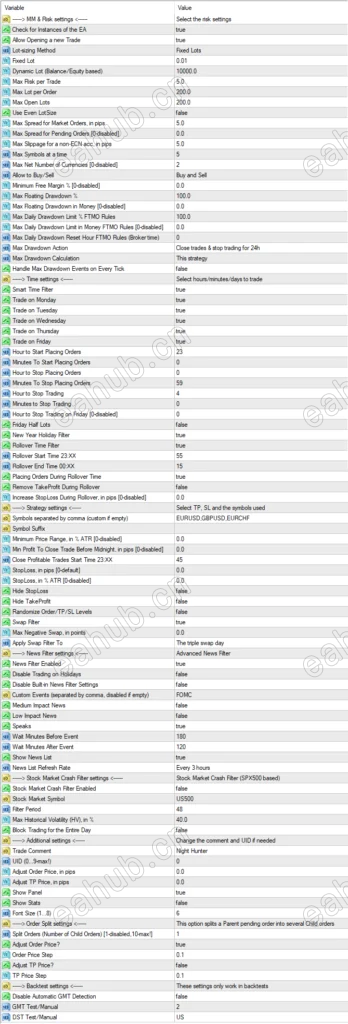
风险设置允许开启新交易——开/关开启新交易。Lot-sizing Method –根据您要承担的风险选择手数大小方法: Fixed Lots 将使用“Fixed lot”参数中的固定手数, Dynamic Lots 将使用 Dynamic Lot 参数,Max Risk per Trade 将计算手数基于每笔交易的风险百分比,三个预定义的将自动为您计算风险Fixed Lot –固定交易手数动态 Lo t-每 0.01 手要使用的余额/权益最大手数——最大允许交易手数使用 Even LotSize——仅以偶数手进行交易以减少佣金。Max Spread, in pips –平仓的最大允许点差 非 ECN acc 的最大滑点,以点为单位——允许的最大滑点一次最大符号数——Hunter Pro EA 允许同时打开的最大符号数。最大净货币数量——限制在同一方向上使用相同货币(不是代码/货币对)的未平仓交易数量。允许买入/卖出——开/关买入/卖出交易。最大回撤百分比——如果当前浮动回撤超过指定百分比,Hunter Pro Robot 将平仓最大每日提款限额 % FTMO 货币规则 [0-禁用] –货币的最大每日提款限额,根据 FTMO 规则计算。不考虑白天的非交易操作(如取款)。最大每日提款重置时间 FTMO 规则(经纪人时间)-重置最大的小时数。回撤与支撑公司。最大每日提款限额 % FTMO 规则 –最大每日提款限额,根据 FTMO 规则计算。不考虑白天的非交易操作(如取款)。
时间开始/停止下订单的分钟数——允许您微调交易间隔。开始下单的分钟数必须是 5 的倍数 (0, 5, 10, 15…50, 55)展期开始时间 23:XX –展期开始分钟。展期结束时间 00:XX –展期结束分钟。Remove TakeProfit During Rollover——在指定的展期时间删除所有订单的止盈。此选项有助于避免在糟糕的交易条件下通过 TP 关闭交易,因为滑点会使有利可图的交易变成亏损交易。在展期期间增加止损——在指定的展期时间增加所有订单的止损。此选项有助于避免在糟糕的交易条件下由于点差扩大而激活止损(这可能导致巨大损失)。StopLoss, in % ATR——基于波动率的止损,表示为平均真实范围指标的百分比。检查 EA 实例 –检查一次是否只有一个 EA 实例在运行。如果 Hunter Pro EA 检测到具有相同 UID 的其他实例,交易将被禁用。周一/周二/周三/周四/周五交易——在周一/周二/周三/周四/周五启用/禁用交易节假日禁用交易——根据实时经济日历 (https://www.investing.com) 在银行节假日启用/禁用交易。此过滤器特定于货币。例如,有了它,EA 将不会在美国银行假期期间进行美元对交易。它也适用于Strategy Tester。
战略以逗号分隔的符号——要交易的货币对列表。 如果您的经纪人使用一个后缀,则需要包含一个后缀!Hour to Start/Stop Placing Orders-何时开始/停止下挂单。如果要优化这些参数,请将Smart Time Filter 设置 为 false。Smart Time Filter-开启/关闭智能时间过滤器Hour to Stop Trading (on Friday) -停止交易的时间(周五)。所有未结头寸将在此时关闭。新年假期过滤器 -开/关圣诞节/新年过滤器StopLoss, in pips –标准 4 位数点的止损值隐藏止损——开/关止损隐藏翻转时间过滤器 -打开/关闭翻转过滤器掉期过滤器——在周三晚上取消掉期负方向的交易。Max Negative Swap, in pips –最大负隔夜利息启用新闻过滤器 -开/关新闻过滤器
消息中等影响新闻——启用/禁用具有中等影响的新闻事件(2 星新闻)。低影响新闻——启用/禁用低影响的新闻事件(1 星新闻)。Speaks——如果为假,那么 Day Hunter Pro 机器人将不会考虑标记为 Speeches/Speaks 的新闻事件。新闻列表刷新率——新闻事件列表更新频率(从下拉列表中选择)。交易品种后缀——在这里,如果您的经纪商使用交易品种后缀,您可以指定交易品种后缀。在展期期间下订单——启用/禁用在展期期间下达挂单。周五减半手数——周五晚上交易手数减半。Handle Max Drawdown Events on Every Tick——启用/禁用每次报价时的回撤事件处理(而不是每分钟一次,默认使用,它可能会消耗更多的 CPU 资源)。午夜前关闭交易的最低利润,以点为单位 [0-禁用] –如果达到指定的利润,则在午夜前自动关闭盈利交易。Hide TakeProfit——开/关 TakeProfit 隐藏。最大开仓手数——在这里,您可以设置一个值来限制 EA 可以在所有货币对上开仓的总手数。Minutes to Stop Trading——停止交易的分钟数。全天大宗交易——如果 HV 在一天中的任何时刻仅一次达到指定水平,则禁止全天开立新交易。显示统计数据——显示一个包含一些统计数据的面板。
其他的贸易评论 –评论UID (0…9) –唯一的 EA 实例编号。一般不用改ShowPanel—— 开/关信息面板GMT/DST 测试 – 冬季的 GMT 偏移量 和测试仪 中的 DST 。 此参数对实时交易没有影响。
订单拆分Adjust Order Price—— 调整挂单开仓价原文说明如下:
Allow Opening a new Trade – on/off opening new trades.Lot-sizing Method – select the lot sizing method according to the risk you want to take: Fixed Lots will use fixed lot size from the “Fixed lot” parameter, Dynamic Lots will use the Dynamic Lot parameter, Max Risk per Trade will calculate lots based on % risk per trade, three predefined will calculate risk automatically for youFixed Lot – fixed trading lotDynamic Lo t- balance/equity to be used per 0.01 lotMax Lot – Max allowed a trading lotUse Even LotSize – trading only with even lots to reduce commissions.Max Spread, in pips – max allowed spread for position closingMax Slippage for a non-ECN acc, in pips – the maximum allowed slippageMax Symbols at a time – max allowed the number of symbols that can be opened simultaneously by the Hunter Pro EA.Max Net Number of Currencies – limit the number of open trades with the same currencies (not symbols/currency pairs) in the same direction.Allow to Buy/Sell – on/off Buy/Sell trades.Maximum Drawdown Percent – if the current floating drawdown exceeds the specified % the Hunter Pro Robot will close open positionsMax Daily Drawdown Limit % FTMO Rules in Money [0-disabled] – maximum daily drawdown limit in MONEY, calculated according to the FTMO rules. Non-trading operations (like withdrawals) during the day are not taken into account.Max Daily Drawdown Reset Hour FTMO Rules (Broker time) – hour to reset the max. Drawdown with the prop firm.Max Daily Drawdown Limit % FTMO Rules – maximum daily drawdown limit, calculated according to the FTMO rules. Non-trading operations (like withdrawals) during the day are not taken into account.
TimeMinutes To Start/Stop Placing Orders – allows you to fine-tune the trading interval. Minutes To Start Placing Orders must be multiples of 5 (0, 5, 10, 15…50, 55)Rollover Start Time 23:XX – rollover start minutes.Rollover End Time 00:XX – rollover end minutes.Remove TakeProfit During Rollover – removes TP for all orders at the specified rollover time. This option helps to avoid closing trades via TP during bad trading conditions since slippage can turn a profitable trade into a losing one.Increase StopLoss During Rollover – increases SL for all orders at the specified rollover time. This option helps to avoid activating SL due to spread widening during bad trading conditions (which may lead to a big loss).StopLoss, in % ATR – volatility-based stop loss expressed as a percentage of the Average True Range indicator.Check for Instances of the EA – checks that only one instance of the EA is running at a time. If Hunter Pro EA detects other instances with the same UID, trading will be disabled.Trade on Monday/Tuesday/Wednesday/Thursday/Friday – enable/disable trading on Monday/ Tuesday/ Wednesday/ Thursday/ FridayDisable Trading on Holidays – enable/disable trading on bank holidays according to the real-time Economic Calendar (https://www.investing.com). This filter is currency-specific. For example, with it EA won’t take trades on USD pairs during bank holidays in the USA. It also works in Strategy Tester.
StrategySymbols separated by comma – list of pairs to trade. A suffix needs to be included if your broker uses one!Hour to Start/Stop Placing Orders- when to start/stop placing pending orders. Set Smart Time Filter to false if you want to optimize these parameters.Smart Time Filter- on/off smart time filterHour to Stop Trading (on Friday)- hour to stop trading (on Friday). All open positions will be closed at this hour.New Year Holiday Filter – on/off Christmas/New Year filterStopLoss, in pips – stop loss value in standard 4-digit pipsHide StopLoss – on/off SL hidingRollover Time Filter – on/off the rollover filterSwap Filter – cancels trading on Wednesday evening in the direction of the negative swap.Max Negative Swap, in pips – max negative swapNews Filter Enabled – on/off News Filter
NewsMedium Impact News – enable/disable news events with medium impact (2 stars news).Low Impact News – enable/disable news events with low impact (1 star news).Speaks – if false, then the Day Hunter Pro Robot will not take into account news events marked as Speeches/Speaks.News List Refresh Rate – news events list update frequency (selection from the drop-down list).Symbol Suffix – here, you can specify a symbol suffix if your broker uses one.Placing Orders During Rollover Time – enable/disable placing pending orders during rollover time.Friday Half Lots – halving trading lots on Friday evening.Handle Max Drawdown Events on Every Tick – enable/disable drawdown event handling on every tick (instead of once a minute, which is used by default, it may consume more CPU resources).Min Profit To Close Trade Before Midnight, in pips [0-disabled] – automatically closes profitable trades before midnight if the specified profit is reached.Hide TakeProfit – on/off TakeProfit hiding.Max Open Lots – here, you can put a value limiting the total lots that the EA can open on all currency pairs.Minutes to Stop Trading – minutes to stop trading.Block Trading for the Entire Day – prohibits opening new trades throughout the day if HV hits the specified level just once at any moment during the day.Show Stats – show a panel with some statistics.
OthersTrade Comment – commentUID (0…9) – unique EA instance number. Usually, no need to change itShowPanel – on/off Info-panelGMT/DST Test – GMT offset in winter and DST in Tester. This parameter has no effect on live trading.
Order SplitAdjust Order Price – adjust the open price of pending orders
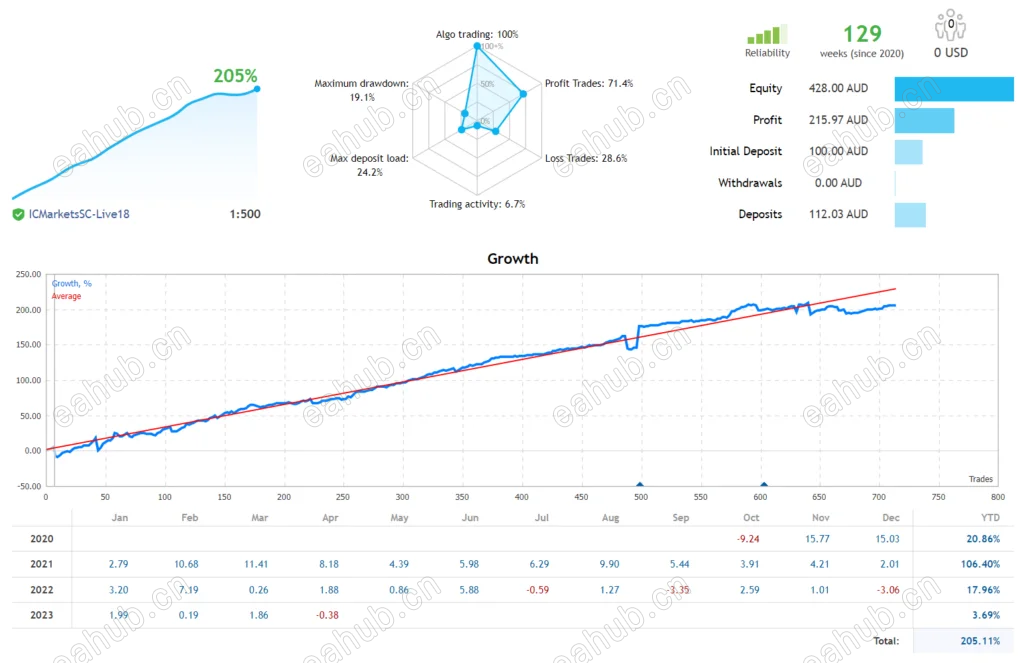
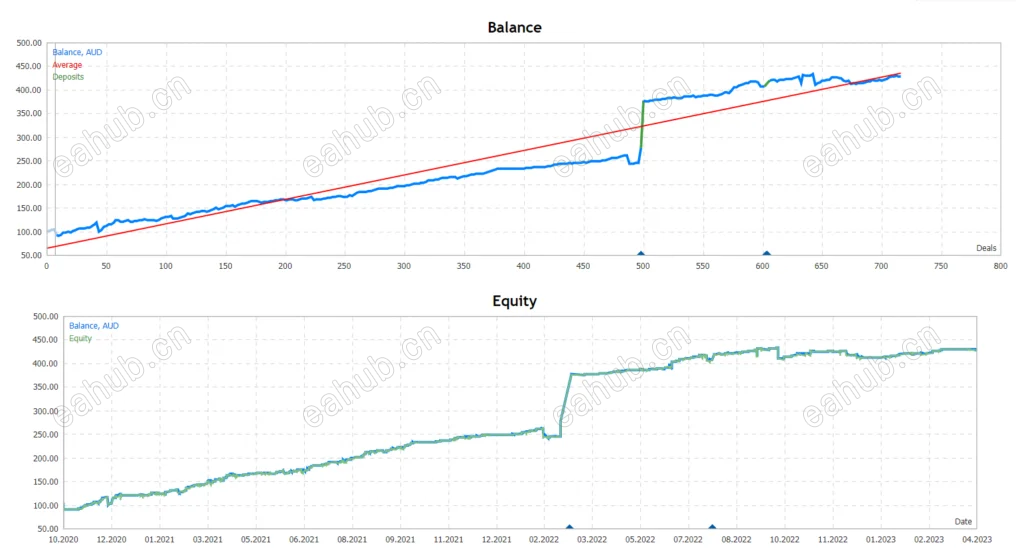
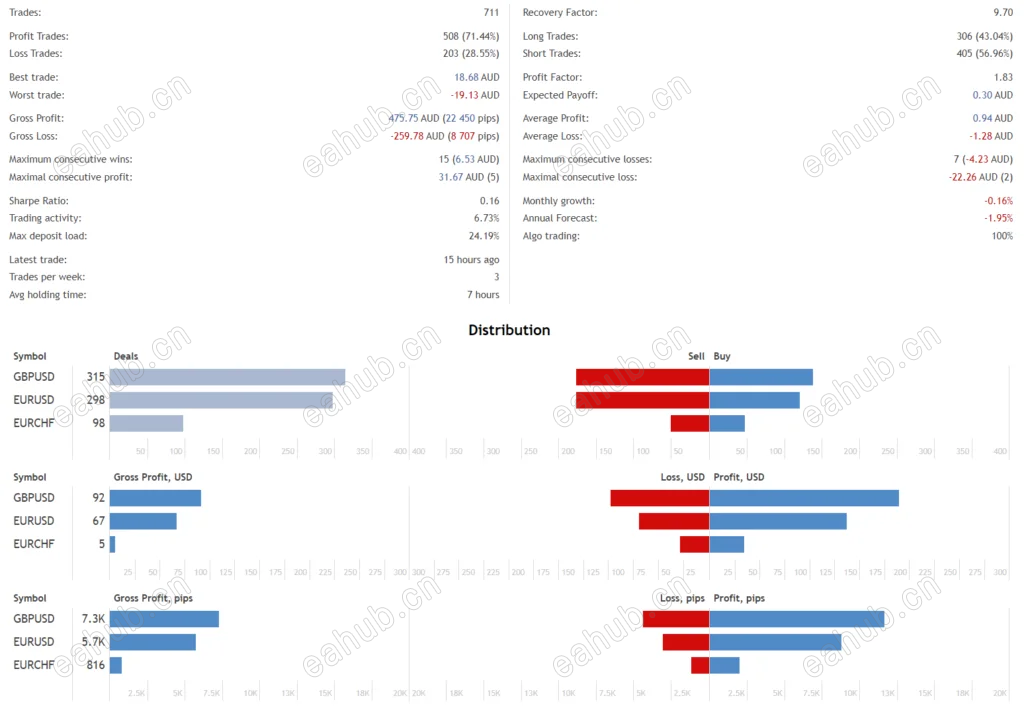
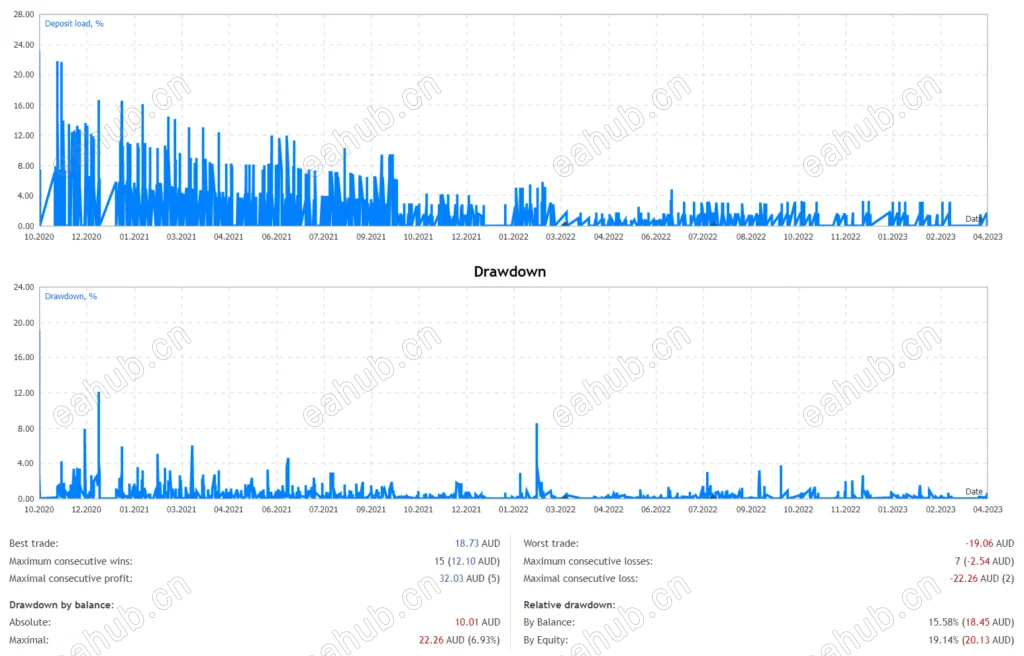
最低账户余额为100 美元(甚至可以使用 25 美元)。在GBPUSD、EURUSD、EURCHF、 USDCAD 和USDCHF 上表现最佳 (适用于任何货币对)仅适用于 M5。 |
|



 发表于 2026-8-9 04:25:59
