|
|
Perfect Score MT5
This robot enters the market at the opening of London Stock Exchange (LSE). It is based on short-term reversal patterns which use the tendency of FX prices to move toward their average value during the LSE session. The EA does not use indicators, grid, martingale, arbitrage. The trading system is suitable for both experienced traders and beginners. The EA includes protection against high spreads, and allows you to trade with a fixed or automatic lot size.
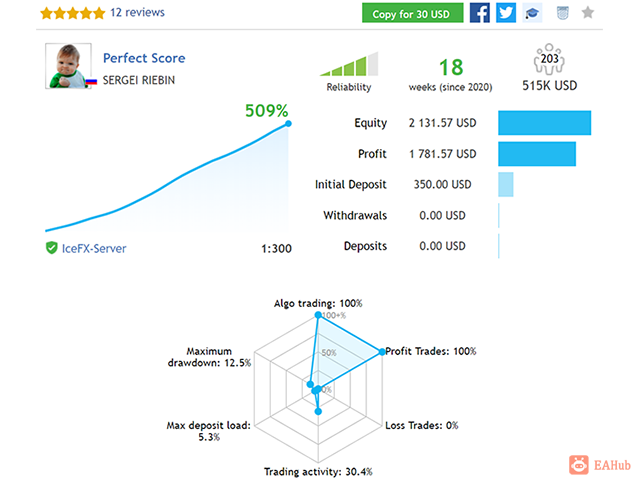
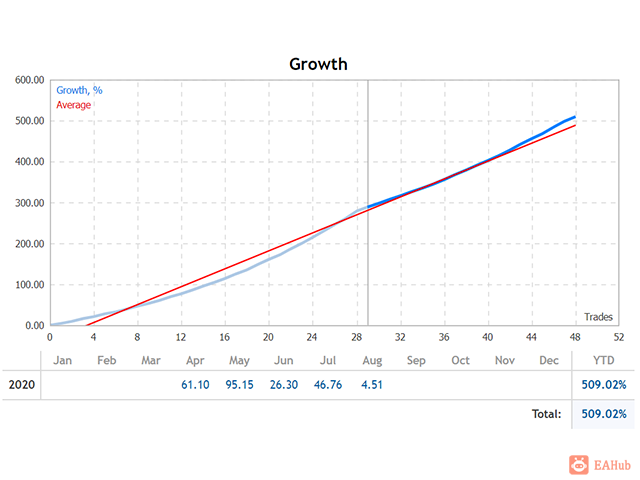
Monitoring - one of the most popular signals at MQL5: https://www.mql5.com/en/signals/779103
Timeframe is M5.
Minimum account balance: $50.
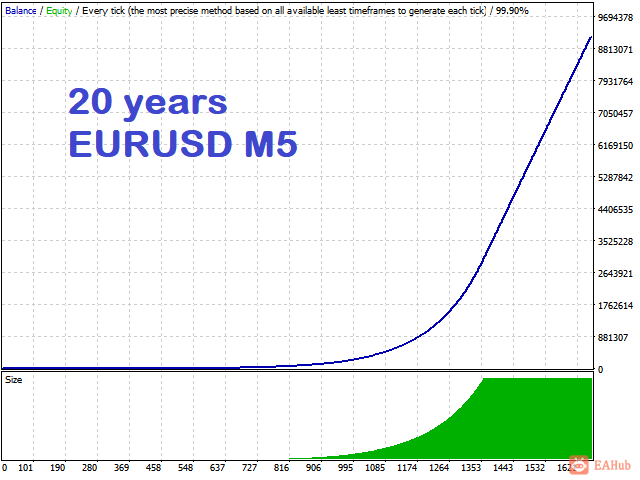
Default parameters are for EURUSD M5.
Requirements:
Hedging account.
Features:
Every trade is protected by stop-loss
The EA is not sensitive to spread or broker, you may chose any broker you trust to
No dangerous money management are used (grid is optional and not used in my signals)
Good resistance to unexpected market events
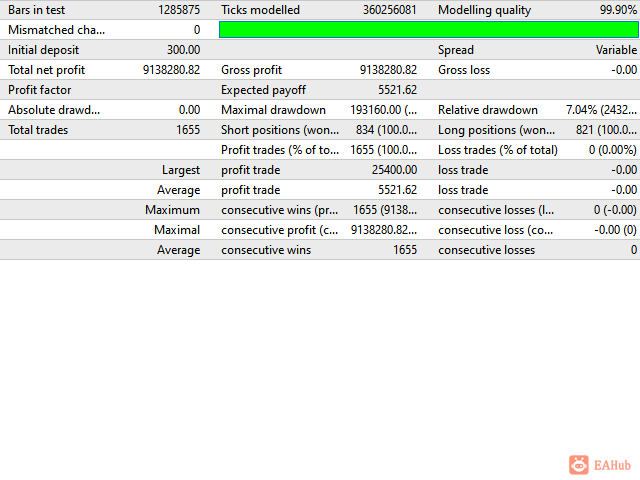
Stress tested with 99.90% tickdata using variable spread
The EA is very easy to setup and use
IMPORTANT: Pay attention to GMT parameters! In order to get proper results, you have to set them correctly according to your broker GMT Offset
Parameters:
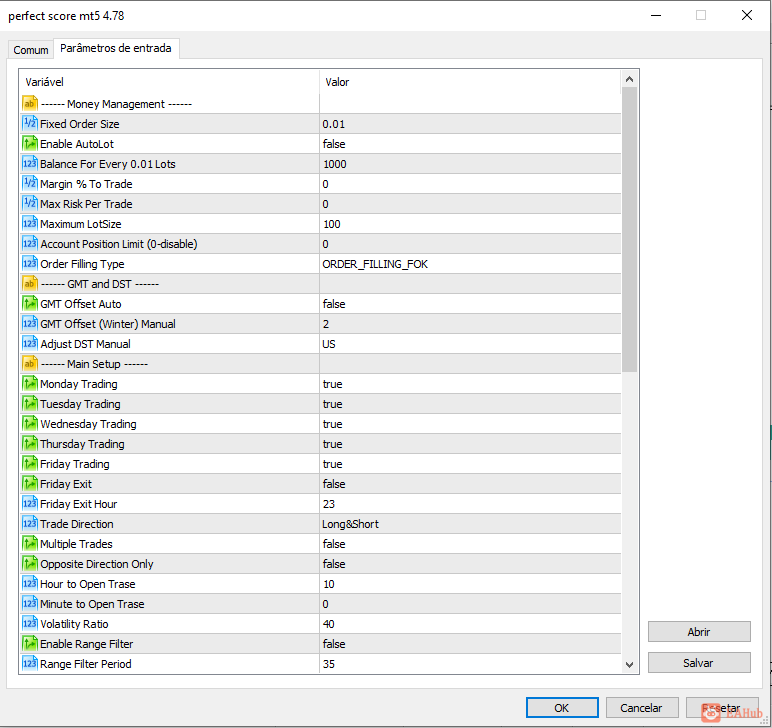
Fixed Order Size - fixed trading lot
Enable AutoLot - use automatic lot calculation
Balance For Every 0.01 Lots - balance to be used per 0.01lots (automatic lotsize based on balance)
Max Risk Per Trade - auto MM based on the stop loss and deposit size. For example: at a value of 5, closing a trade by stop loss will result in a loss of 5% of the balance
Maximum LotSize - maximal allowed trading lot
GMT Offset Auto - if true, the EA will find the GMT offset automatically. Allow requests to https://www.worldtimeserver.com
GMT Offset Manual - set your broker's time zone (in winter)
Adjust DST Manual - set your broker's DST
Monday Trading - enable/disable trading on Monday
Tuesday Trading - enable/disable trading on Tuesday
Wednesday Trading - enable/disable trading on Wednesday
Thursday Trading - enable/disable trading on Thursday
Friday Trading - enable/disable trading on Friday
Friday Exit - if you wish to close all trades on Friday, you should use FridayExit=true
Friday Exit Hour - the robot will close all open positions at this hour on Friday
Trade Direction - long and(or) short can be selected
Volatility Ratio - filter based on intraday volatility. Default value: 40. Recommended values: 0...100
Hour/Minute to Open a Trade - here you can adjust the hour/minute for opening a trade. It has to be set in GMT+2 DST:US/EU (corresponds to GMT+2 in winter, GMT+3 in summer) timezone which gives five full 24-hour daily candles each week and is used by most brokers. The daily candles open at 0:00 during the bank rollover time. I use default settings. This parameter does not depend on the broker or PC/VPS local time. Minutes should be divisible by 5, for example: 0,5,10...55
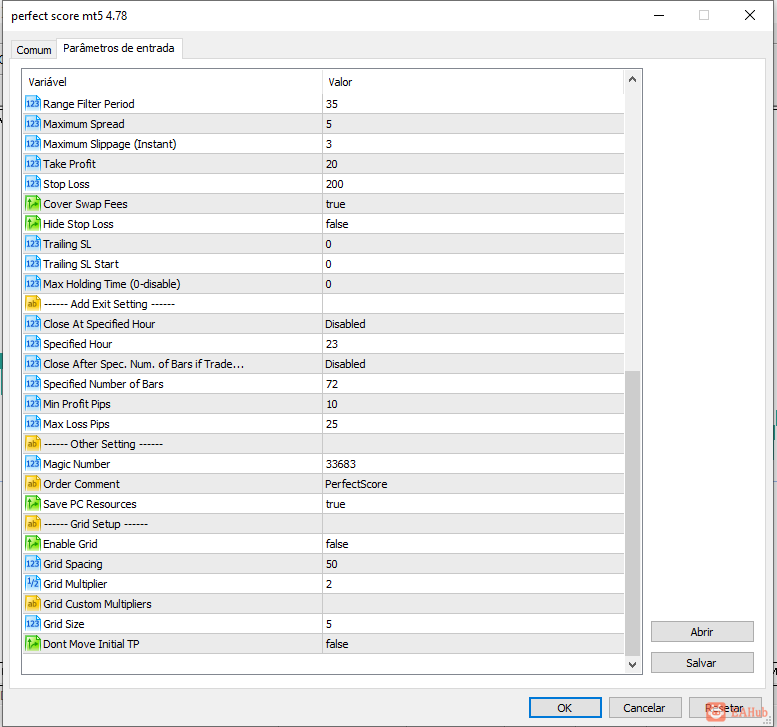
Maximum Spread - maximum allowable spread, pips
Maximum Slippage - maximum allowable slippage for instant accounts, pips. Increase it to avoid re-quotes and off-quotes
Take Profit - take profit in pips (1 pip = 10 points for a 5-digit broker)
Stop Loss - stop loss in pips
Hide Stop Loss - enable/disable hiding stop-loss (SL is executed by the EA). If Grid strategy enabled, SL will be disabled at all
Trailing SL - trailing stop in pips
Trailing SL Start - when to start the trailing stop
Max Holding Time - max position holding time - a maximum number of bars between opening a position and closing it completely. This feature closes orders regardless of whether the trades are profitable or not
Magic Number - unique identifier for EA's orders
Order Comment - comment for EA's orders
Enable Grid - enable/disable grid strategy. I will not use the grid strategy, it was requested by customers
Grid Spacing/Grid Multiplier/Grid Size - space between orders (pips) / grid multiplier / max. number of grid orders
Grid Custom Multipliers - custom multipliers for each step separated by a comma, for example - 1,2,4,8,16
Please note that past results cannot guarantee future returns. Even the best hedge funds in the world cannot guarantee it.
 |
|



 发表于 2026-8-11 06:53:59
